Introducing Bring Your Own Cloud
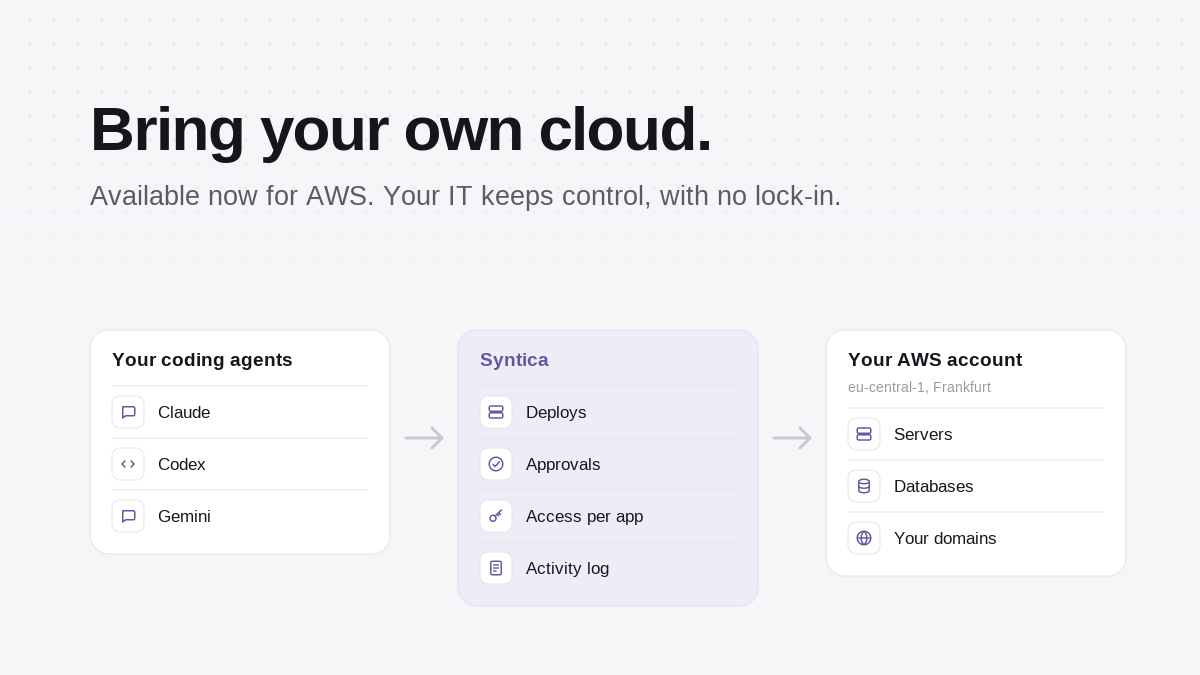
Today we are launching Bring Your Own Cloud. Your apps can now run in your own cloud account, instead of on our servers. For now, that means AWS.
For the people building, nothing changes. They keep building in a chat with Claude, or with the coding agent they already use. What changes is where the apps run, and who is in control of that.
Why we built it
Almost every conversation with an IT team reaches the same question before anything goes live: where does it run, and who controls it? For a lot of companies, "on someone else's servers" is where that conversation stops. Usually not because of the hosting itself, but because their policies, their contracts and their auditors expect company apps to live in the company's own cloud.
For teams, that often meant one of two outcomes. Either the idea waited in IT's queue, or someone built it anyway, somewhere IT could not see it. Neither is good for the business. Bring Your Own Cloud takes that dilemma away: the app runs where IT already works.
What it looks like in practice
Say your finance team needs an app to approve purchase orders. Someone on the team describes it in a chat with Claude. A few messages later it is running, in your company's AWS account, with its own web address.
IT sees it in the overview straight away: who built it, who can use it, and every change since. An admin decides how much compute the production version gets. When the team later asks for a bigger database, that request waits for an admin to approve it. Nobody had to open a ticket, and nothing ran outside IT's view.
What gets better
First of all, your IT keeps control. Apps run in your company's own account, under the security policies you already have. Every app shows up in one overview, with who built it, who can use it and every deploy, change and approval in the activity log. You decide who can do what, per app and per environment, with roles you build yourself. And you decide what each app gets: the compute for every environment, and limits for its databases. Anything bigger becomes a request an admin approves or declines.
Second, there is no lock-in. Disconnect Syntica and your apps keep running in your account, and nothing is deleted. The servers, the databases and the app data live with you, and the code is ordinary code you own. Syntica keeps running the workflow: the chat, the deploys, access and the activity log. Cloud costs land on your own invoice, from your own provider.
And you do not have to move everything at once. Run the apps that matter most in your own cloud, and keep smaller ones on our hosting, all in one organisation.
Who it is for
Internal teams that build what their department needs, and want IT to say yes. With Bring Your Own Cloud, the answer to "where does it run?" is the account IT already manages.
Consultancies and agencies that build for clients. One organisation can connect several cloud accounts, for example one per client, and you pick the account for each app. So every client's apps run in that client's own account, while your team manages them all from one place.
Getting started
Connecting your AWS account is one step in your AWS console, and your IT team can review it before anything happens. Syntica can only change what it created in your account. Your own users, roles and other systems stay out of reach. After that you choose where each app runs, and your teams build exactly as before.
Apps run in the EU, in AWS Frankfurt (eu-central-1). AWS is the first cloud we support. More will follow.
Bring Your Own Cloud is open to every customer. We switch it on after a short walkthrough of the product, where we also go through your setup and pricing. Request a demo, or read how it works in your own account first.